Showing posts with label Mosaic Reviews. Show all posts

Monday, May 20, 2013

HM Review: My Home School Grades

Note: Our family received a free subscription to My Home School Grades for this review. Opinions are our own. No other compensation was involved.


To start with, I have to admit that I find transcripts terrifying and the idea of assigning grades, much less keeping track of them, paralyzing. There's something intimidating about writing it all down. My early homeschool record-keeping took place in fits and starts, books read, narrations, things checked off a list. I can't tell you how many times I started with the best of intentions, only to sputter out a few weeks into the process. If you were to look at my records, you'd wonder about our girls' education.

Standardized test scores say they were/are getting some kind of education. The younger two have tested at the top of the scale over the years. (Youngest's final state-mandated test is coming up next year, and she's very happy to see the end in sight.) Eldest is special needs and always struggled with academics. Frankly, I didn't worry too much about a transcript for her. Just learning as much as possible was a good goal.

Transcripts -- the "love language" of colleges (Lee Binz)

I attended an online seminar in creating transcripts, taught by Lee Binz. One of the things she said that struck me is that transcripts are really the way that you communicate with a college that might be considering your student for admission.

Granted, none of ours are interested in college right now. They hear about massive college debt, for one thing, and people having trouble finding jobs even with college degrees. None of them is interested in being a doctor, lawyer, or engineer at this point in their lives. Don't get me wrong, they're not aimless drifters with no plans for the future. It's just that their plans don't necessarily require four more years of academic studies.

Still, they might choose to go to college someday. Add to that, they have been learning an awful lot over the years, of history, geography, literature, science, and yes, even math. I think they could hold their own against their peers. It seems a disservice, not to document their learning somehow, and portfolios and transcripts are the current way to do that.

What I needed was something easy to use, intuitive, that would lead me gently by the hand despite my intimidation.

Enter My Home School Grades...

Okay, more True Confession time here. I did not volunteer to do this review. (Did you know that oftimes reviewers volunteer/beg/plead/submit requests for review products?) I said I'd help out if another reviewer was needed. I really would have preferred, ostrich-like, to have kept my head buried in the sand for another few months of blissful ignorance.

(Do you know how hard it is to put a transcript together from fading memory?)

Of course, the Lord knew what I needed, even though it was not what I wanted. He knew that I had been slipshod in keeping records, and that putting together a transcript for Middlest to graduate in a couple of years would have been even more agonizing than pulling together her records right now.

When I received the link to My Home School Grades with word that I had been picked to review the program, I dutifully signed up for an account -- easy! -- and started to play around a bit. I entered information for all three of the girls, added a few classes, thought about activities, exited the program, and managed to forget about it until the review deadline was looming.

In the meantime, I took Lee Binz' online transcripts class, which helped a lot with some of my confusion. (Like, how do you record high school level work done earlier than 9th grade? How do you record college-level work done in high school? How do you actually assign credits for work? How do you figure out grades?) Which means, when I finally got back to My Home School Grades I was a little more confident. I added in lots more classes, a whole slew of activities -- volunteering, choir, that sort of thing), even... gasp... assigned grades.

User helps -- such as video tutorials

Mind you, I did all this without even checking out the tutorial videos available on the site. I was able to use the site without the tutorials -- the whole thing is pretty intuitive. However, I found (afterward) that the videos are very helpful and gave me a much better idea of the scope of this simple-seeming program. It's amazing how much you can do!

The tutorials currently available show you how to add a student, a class, or activity, and how to generate a transcript from the information you add. You can watch them at the My Home School Grades website to get a better idea of the program.

Powerful features

For such a simple-seeming program, My Homeschool Grades offers a variety of features. You can keep a record of your child's learning from kindergarten through grade 12 (and beyond, with community college dual enrollment). There are several options for adding a class. The lesson plan option allows you to choose a particular curriculum (in which case lessons are automatically added) or a custom curriculum (which allows you to create your own lesson plan).

As you can see from the figure above, the program allows you to use weighted grading, in an easy, visual format.

You can also add classes that receive an overall letter grade or pass-fail mark, and there's an option for indicating dual-enrollment where college and high school credit are earned at the same time.

Adding activities uses the same method as adding classes -- drop down menus, intuitive visual feel. In this way, you can document volunteer work, extracurricular activities, choir, band, sports, 4H, and more. You can choose to include these on a transcript, or leave them off, but in any event, you have a record of activities on file. 

Transcript creation, at the click of a button

 Well, it's just a little more complicated than that. After all, you have to enter all the information that's going to appear on the transcript. What My Home School Grades does is arrange it all in a professional-looking format. It looks something like this on the screen:

Click the "Print" button to print out a copy. You have the option of adding the graduation date and the student's SSN to the transcript before printing; however, this information is not stored. (I really like that the SSN is not stored!)

Ordering details

My Homeschool Grades is offering a 14-day free trial, so I urge you to check it out for yourself. A lifetime membership is $49.99 and covers all the students in your family. No matter where you are in your homeschool journey, convenient, efficient record-keeping is just a few mouse clicks away.


Friday, May 10, 2013

HM Review: Waterproof Bible!

Note: Our family received a copy of the Waterproof Bible like the one pictured here for review. Opinions are our own. No other compensation was involved.

Here is a product that meets a need I didn't even know I had... though I've had thoughts along this line every time we've gone camping. Another thing... I love to read in the bath, but there's no way I'd take my precious, marked-up, Bible into the bathtub, with its leather cover and thin pages. I already know it's not waterproof. When it was fairly new (more than two decades ago now), Eldest was a toddler and took a fancy to the pretty ribbon page marker. She explored everything by putting it in her mouth, and... suffice it to say, the ribbon was not colorfast and left burgundy splotches on the pages.

Compact, but readable

The Waterproof Bible sitting in front of me as I type this doesn't look or feel all that different from other slimline Bibles I've handled. The cover and pages have something of a silky feel. At first glance, the pages seem as thin as the delicate pages in my personal Bible. Granted, what I have here is the New Testament, Psalms and Proverbs so it shouldn't be all that bulky anyhow. At 4-1/4" x 7" and a little over half an inch thick, this 342-page softcover is compact enough to fit in my purse. The full Waterproof Bible with all the Old Testament as well is a little larger in all dimensions, and has about twice the number of pages.

The print is small, 7 point, but clear and readable. (The publisher offers a bookmark magnifier in their shop (click on Accessories) if you need one.) The shiny pages might present a little glare if you read in bright sunlight, but we didn't notice a problem with glare when we passed the Bible around during our regular Bible reading times.

Study helps are minimal. There's no concordance, for example, or extensive cross references. I like the footnotes, which include translation notes as well as references when Old Testament passages are quoted, so you can go to the original passage and read it in context while digging deeper.

...but can you write in it?

That was one of my first questions. I mean, if it resists water and mud, surely it's going to resist ink and highlighter? Such a Bible would be handy for camping and reading, but not so easy to interact with.

However, I'm happy to report that you can write on the pages (pencil and ballpoint are recommended) and highlight passages with colored pencil or dry highlighters (you can find dry highlighters in the publisher's shop at the link above). Best of all, the pages don't bleed through! You can highlight or mark on a page without having it affect the text on the other side of the page.

Sturdy!

I held my breath and opened the Waterproof Bible flat -- something I avoid with softcover books, unless they have a "lay flat" binding. I pressed it down for good measure as I read, turned over a few pages, read again, turned to another section, and finally closed the book. I felt like a criminal, a maimer of books... until I examined the back of the spine. There were no tell-tale creases to give mute testimony to my careless handling.

You may laugh at me and call me a book fanatic (I prefer the term bibliophile, sounds so much better, doesn't it?) but I actually trained my children in the fine art of reading paperbacks, cracking them open just enough to be able to read the print, and no farther, and never leaving a book on its face, to avoid breaking the spine. If you see creases on the back of a paperback, it means that eventually pages are going to start falling out. I have no such worries with the Waterproof Bible. I have the feeling it will last a long time, just as its publisher promises.


The Waterproof Bible is available from Bardin & Marsee Publishing and Christian bookstores (there's a "find a retailer" feature at the publisher's website). There are ESV, KJV, NKJV, NIV, and NLT versions, in a variety of cover choices. Full Bible versions are $44.95, New Testament/Psalms/Proverbs versions are $24.95. For an additional $7 you can have your Bible imprinted to personalize it with a name or initials.


Friday, February 22, 2013

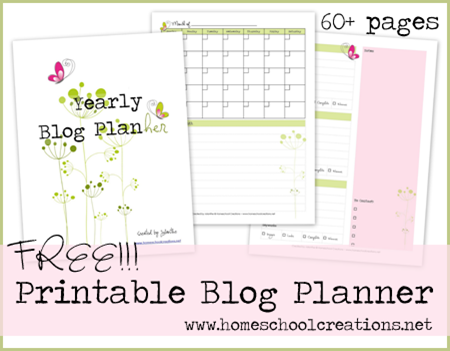
HM Review: Free Printable Blog Planner from Homeschool Creations

Here's my very first review for the Mosaic Reviews Team, from Homeschool Mosaics. Members of the review team were given a list of free blog planners to choose from. It was a difficult choice! I might have chosen a one-page planner that sort of hit the highlights, or a blog planner that had a nice introduction to blogging and a mini-lesson on setting priorities.

But the Free Printable Blog Planner from Homeschool Creations really spoke to me. I almost passed it by, at first glance. I found 63 planner pages to be overwhelming. I barely have enough time to keep up a blog as it is... and yet, as I perused the pages I found so much practical help that I kept reading. I can also reassure you that you don't really get 63 unique pages to agonize over. Much of the planner is made up of the same few pages, 12 copies of each, so that if you print the planner and bind it, it'll be good for a whole year.


Anyone can be a hit-or-miss blogger. I've done it for years, but I'm trying to get more methodical in this endeavor, as in many others. However, with blogging, as with so many other things, a little planning goes a long, long way. Now if I could just get a little ahead on my blog posts, so that they could be automatically scheduled and just, plunk! -- sort of post themselves. That takes time. I've gotten better at planning, but too often lately I've been thrown off my blog plan by an unexpected curve ball, like coming down with a cold, or a too-busy schedule.

With a blog planner, though, I can think through the coming days and weeks, write down themes and ideas, and actually have a target to shoot at. It's so much better than sitting down at the keyboard, looking at that blank page, and thinking in a panic, "I have to blog something!"

So what do you get in this blog planner? There's a pretty cover sheet, a link to a blog post where the author shows how she uses her planner (I always find this kind of thing to be very helpful, as I tend to be seized by paralysis when confronted with a blank form), and a 2013 year-at-a-glance calendar. For each month, there's a blank monthly calendar, with an area to record a focus (or eleven) for the month; a page to document reviews, giveaways, notes, and contact information; and two pages of weekly calendars with room for a to-do list for each week. (I haven't used the weekly calendars yet, but I can see how they would be useful as I ease into regular blogging.)

Additional planning helps include pages that will help you keep track of blog statistics, websites and passwords, affiliate information, Twitter hashtags, linkups, an income and expense sheet, and (for the serious blogger whose blog is her business) even a mileage tracker.

A couple of "Notes in my head" pages round out the planner -- honestly, these two pages are the ones that I've found most useful. Now I'm keeping my notes in one place, rather than stuck on sticky notes that end up who-knows where.

The planner is done in a pretty pastel pink-and-green color scheme. It looks really nice on the screen. Mine is printed out in grayscale for the sake of my budget, but it still works.

You can print the planner and bind it, or punch the pages and put it in a separate section of a planning notebook, or even break out the monthly and weekly pages and incorporate them among your homeschool/home planning pages. It's a versatile format!

You can download your own copy of the planner at the link above. It's free!


Wednesday, January 23, 2013

New Review Team!


You may have seen other people announcing the new review team being launched by the people behind the Homeschool Mosaics website. On the other hand, this may be the first you've heard of it.

In any event, I wanted to let you know that I've joined the Mosaics review team. There are more than 100 of us who will be receiving products and posting reviews of how they work for us and our families. These won't be just homeschool curriculum, but household and personal products as well!

Here's a link to the Mosaic Reviews website. If you're interested in joining the team, click here for more information!