Bear with me -- the pictures in this post were taken with my phone, not the best camera in the world, but the best we've got at the moment.
Over a year ago, a couple members of our family went gluten free. One of the things they really missed was bread. I looked up lots of GF bread recipes, tried quite a few off the Internet, checked out a number of GF cookbooks from the public library, bought the ones with the tastiest recipes, and basically re-learned how to cook anything involving flour.
One of the books I ended up buying without first trying was Healthy Bread in Five Minutes a Day
by the author of Artisan Bread in Five Minutes a Day, a cookbook I had just begun to explore when it became necessary to get all gluten-containing ingredients out of the house. (Some families can manage divided kitchens, rather like keeping Kosher, I'm told, but with the severe gluten problems here it's just not worth the risk.)
Early on, I tried out one of the recipes from Healthy Bread in Five Minutes a Day. It was a miserable failure; it looked terrible, even though people said it tasted okay.
I didn't have a heavy-duty stand mixer at the time, and I kept running up against GF bread recipes calling for such a mixer. No more hand-kneading dough; that wasn't going to cut it. When Christmas arrived and I saw a good sale, I asked for a Kitchenaid mixer for my present (and birthday, and anniversary, and Mother's Day, if necessary, seeing how it was such a big present). I got one!
Things began looking up in the bread-baking department. Our GF bread recipes started turning out looking and tasting better. I had two pieces of information that made all the difference: mixing the dough with a stand mixer, and baking until the internal temperature was between 205 and 210 F. I don't remember where I first read this, but I've seen it on several GF recipe websites since then.) Even so, it was easier most days just to pick up some GF bread from the store. We found a couple of brands that were passable, and even though it didn't taste as good as homemade, and was sort of dry and crumbly, it was convenient.
I ran across Healthy Bread in Five Minutes a Day last week while getting another cookbook off the shelf, and pondered giving it another try. I had all the ingredients, after all. I even had the heavy-duty stand mixer!
Yesterday, I made up a batch of Gluten-Free Brioche. It rose amazingly (over the top of the large mixing bowl during the 2-hour rise time, and continued to rise in the refrigerator overnight). I shaped 1/3 of the dough into a loaf and baked it in a loaf pan. I'm sorry I don't have any pictures to show you -- we ate it all in record time. It was so GOOD! No sign of the uneven texture and unappetizing "look" that had made me put away the cookbook for months. The heavy-duty stand mixer really made a huge difference.
The dough will keep up to five days in the refrigerator, and the recipe makes three loaves' worth. A loaf can also be a dozen dinner rolls, a pan of monkey bread, or a pan of cinnamon rolls, by the way.
...which is what we're doing today. I took some pictures with my phone, so you actually get to see what I'm talking about today.
It almost looks like it's smiling and tipping its hat, doesn't it? I really didn't think it would rise all that much more, yesterday, or I'd have put it in a larger container. This jar was only about 2/3 full when I put the leftover dough in, after baking a loaf of bread yesterday.
Talk about convenience! With the dough already made, all I had to do was roll it out, mix up a simple filling, spread, roll up, cut, and put into a greased pan.
Can it get any easier than that? With the same amount of effort that it takes to stir up a loaf (maybe two) of gluten-free bread, I can bake a loaf and still have dough waiting in my refrigerator, ready to bake.
I may never have to resort to store-bought GF bread again...
Here's the first step, sprinkling a silicon baking sheet with sugar. (Wondrously non-stick surface...)
Next, add the dough, about the size of a cantaloupe.
Lay on a piece of plastic wrap and roll out to about 1/4 inch. I had just finished the rolling out and was starting to lift the plastic wrap off when the phone rang. The plastic wrap was coming off easily but when I was interrupted, I left it on and ten minutes later it was beginning to stick to the dough. Lesson learned -- roll out the dough and get that wrap right off!
Tuesday, March 13, 2012
Friday, March 2, 2012
TOS Crew: Reading Eggs/Reading Eggspress
Reading Eggs/Reading Eggspress is a website dedicated to reading, or rather, learning to read, aimed at children aged preschool to about 12 or 13. (Our 13yo was not terribly thrilled with the site, but more about that in a minute.)
My first impression wasn't all that favorable (as I said above, more about that in a minute), and I'm so glad I didn't run with that, but took the time to explore the site further. This review will deal with Reading Eggspress, the component for students who have already learned to read and just need to work on cementing those reading skills.
Youngest (the aforementioned 13yo) was in a contrary mood when I told her we'd be sitting down to look at the Reading Eggspress website. She had a bad attitude for most of our trial, only going to the site under duress and complaining the whole time. (Well, not outright complaining, but disparaging the graphics as "babyish" and the exercises as "stupid" -- it's a good thing there's a free trial so you can check out the website for two weeks for yourself!) Since I've watched her play FaceBook games with similar graphics, I couldn't understand her resistance, except maybe this website was academic in nature, and she's always been something of a reluctant reader.
Though she reads a lot these days for pleasure, it's mostly likely to be fiction, like old fashioned books (Horatio Alger, Louisa May Alcott) or modern fantasy (Narnia, Warrior Cats). Though Reading Eggspress has a whole library full of e-books to browse, the non-fiction selections look an awful lot like the books we check out from the library for research (which Middlest eats up, but Youngest resists reading), and the fiction wasn't to her taste, though there was a wide variety. There was one story she tried about an elf, but the pictures were too graphic; and another story that was a re-telling of an Aesop's fable, that she pronounced too babyish, and besides, there were exercises to be done and she really resented that.
In short, Youngest had a chip on her shoulder from the beginning, and while she's played such games online for fun, this was not the right time and place for this review.
In desperation, I sat down and signed on to her account and started working my way through the site. I found all sorts of features that would normally delight Youngest if she started with the right attitude. The site is heavily graphics driven; you have an avatar that moves through the virtual world. Reading Eggspress is a floating island, complete with an apartment high-rise (where your avatar has a home and shops), a library full of books, a gymnasium (for, you guessed it, exercising your reading muscles), a stadium where you can compete against the computer or other users).
When we first signed into Reading Eggspress, the site gave us a reading comprehension test. While I was expecting Youngest to pass such a test pretty handily (being at the top end of the age spectrum for the site), I was surprised to see her miss several questions, the type that appear on standardized tests. I thought, Well, maybe there's something here for her.
She began to explore the site, complaining the whole time (as I mentioned above). It was not fun because of her attitude. Later on, when she'd accumulated some eggs and we went to the virtual store to do some shopping, she forgot that she didn't like the site and was actually interested for a bit, in shaping her avatar's appearance and buying a pet and some furniture.
While exploring, I found exercises for dictionary skills, brain games, grammar and spelling practice, and of course, reading practice and comprehension. One nice feature is that the site gives the student a range of book choices for reading practice. I learned a lot, for example, about polar animals during my exploration!
Pricing and availability
More information, including links for the free two-week trial and subscription information for Reading Eggs is available at the Reading Eggs website. A one-year subscription is available for $75 for the first child (you can add additional children at a discounted price), or $9.95 a month.
I encourage you to check out the two-week free trial to see how it works for your young learner.
Read more TOS Crew reviews of Reading Eggs/Reading Eggspress at this link.
Disclaimer: Our family received one free three-month subscription to Reading Egss for review purposes. No additional compensation was involved.
Tuesday, February 28, 2012
Mashed potato pancakes
Mashed potato pancakes make for an easy lunch, especially if you have leftover mashed potatoes, but even if you don't (if you use instant mashed potatoes, that is).
We get instant mashed potatoes from Costco, in a box full of packets. (Mice absolutely adore Costco instant potatoes, by the way. We have to take them out of the box and put them in a heavy-duty plastic container. Now that the mice are gone, we don't want them to discover any new reasons to return.)
One packet makes eight servings, mixed with nearly three cups of water, 1/4 cup of butter, and a cup of milk. I suppose you could make your mashed potatoes dairy-free if need be.
To make our potato pancakes today, I mixed a batch of mashed potatoes with a cup of gluten-free flour mix and two eggs. I heated up some coconut oil in the frying pan and when it was sizzling hot, I put three dollops of the potato mixture in and flattened them slightly. The trick, then, is to leave them alone until they start to brown, and then flip them and brown them on the other side. If you try to flip them too soon, you end up with mush and pieces of pancake stuck to the pan -- in other words, a mess!
Somehow the eggs and flour help to keep the mashed potatoes together in cohesive cakes, rather than turning to mush.
We eat them with applesauce and sour cream. Yum!
Next time I'll try to remember to take pictures -- my phone doesn't have the best camera but at least it's there, unlike the "good" camera that has been misplaced somewhere in the house. (At least I hope it's in the house.)
We get instant mashed potatoes from Costco, in a box full of packets. (Mice absolutely adore Costco instant potatoes, by the way. We have to take them out of the box and put them in a heavy-duty plastic container. Now that the mice are gone, we don't want them to discover any new reasons to return.)
One packet makes eight servings, mixed with nearly three cups of water, 1/4 cup of butter, and a cup of milk. I suppose you could make your mashed potatoes dairy-free if need be.
To make our potato pancakes today, I mixed a batch of mashed potatoes with a cup of gluten-free flour mix and two eggs. I heated up some coconut oil in the frying pan and when it was sizzling hot, I put three dollops of the potato mixture in and flattened them slightly. The trick, then, is to leave them alone until they start to brown, and then flip them and brown them on the other side. If you try to flip them too soon, you end up with mush and pieces of pancake stuck to the pan -- in other words, a mess!
Somehow the eggs and flour help to keep the mashed potatoes together in cohesive cakes, rather than turning to mush.
We eat them with applesauce and sour cream. Yum!
Next time I'll try to remember to take pictures -- my phone doesn't have the best camera but at least it's there, unlike the "good" camera that has been misplaced somewhere in the house. (At least I hope it's in the house.)
Monday, February 27, 2012
TOS Crew: Beeyoutiful
We reviewed Beeyoutiful's Berry Well a couple of years ago, and I was so impressed with the product. It tasted good and worked wonders at cutting colds short, and I wasn't allergic to it. (I had to stop using echinacea and goldenseal some years ago, and those were my go-to cold stoppers up to that point. Worked wonderfully, until I started having severe allergic reactions. Apparently the small amount of echinacea in Berry Well isn't enough to set me off.)
This year, I was so excited to get another package from Beeyoutiful. This time we received two items: lip balm and OW Ease, an arnica salve.
The lip balm went into my purse, where it comes in handy for dry, chapped lips. Frankly, I forgot about it for a few weeks, until one day my lips were dry and getting drier. You know how it is, where your lips feel tortured, and you know you shouldn't lick them to give them relief because they'll just end up drier, but you can't help licking them because you're miserable, and so you dig in your purse hoping to find something...
Ahhh. Beeyoutiful B.A.L.M to the rescue. What a nice surprise! Instant relief, and it didn't just wear off, but worked some healing along the way. The orange flavor was subtle but refreshing, and the balm left my lips soft and relieved that distressing dry feeling. I'm so glad I "lost" it in my purse. I've put it in a special pocket since then, so I can always find it.
We put the OW! Ease to use almost as soon as we unpacked it. The Giant Schnoz was being especially affectionate and excited that day, and rammed her giant-sized head into someone's midriff, causing her to trip over a chair and fall into the table. It looked like painful bruises were going to result, so we broke out the OW! Ease and applied it at once. It really did the job, as I expected it to (we've used arnica for years, for bruises and swelling), and was easy to apply, not as messy as the arnica gel we keep on hand.
Pricing and availability
Beeyoutiful All-natural Lip Balm ($3.00) and OW! Ease ($15.00) are available, along with a number of other effective, natural health-care products, at the Beeyoutiful website.
Read more TOS Crew reviews of Beeyoutiful products at this link.
Disclaimer: Our family received Beeyoutiful Lip Balm and OW! Ease for review purposes. No additional compensation was involved.
TOS Crew: See-n-Spell
When we reviewed See-n-Read products last year, I wrote a glowing review. It was a concept I'd already been using, affordably packaged and more attractive than my homemade version. The idea: a thin plastic overlay with a reading window.
As you can see from the picture, this See-n-Read tool is laid over the page. There's a clear reading window surrounded by grayed out film. You move the tool down the page as you read, and it helps your eyes track efficiently. It helps you keep your place on the page, something that two of our girls have had trouble with in the past. (They still have trouble when they're tired, actually.)
Another version of the tool (the Memory Mark) has a cut-out window so that you can make notes on the page you're reading. You could use this tool in math as well as reading, for example, to keep track in a column of numbers just which place value you're dealing with.
This year, we were introduced to a new product, the See-n-Spell book that comes with a See-n-Read tool. The author's idea was to make words more available to authors who struggle with spelling. If you know the first few letters of a word, you can look it up in the alphabetical listing of words. (Want to know the word I struggle with? "Accommodate." It gets me almost every time I use it.) Instead of using a simpler, more easily spelled vocabulary in your writing, you can use See-n-Spell Quick Reference Guide to find the word you're thinking of, the word that really fits what you want to say, but it just doesn't look right on the page.
There are three sections in the Quick Reference Guide. The first has an alphabetical list of more than 300 most commonly used vocabulary words, but that's not all. The words are divided into grammatical categories or parts of speech: noun, pronoun, article, conjunction, verb (regular and irregular), adjective, adverb, and preposition, plus homophones (words that sound alike but are spelled differently). I've found this division useful for my natural speller who's been able to spell just about anything since she was in elementary grades, but whose grasp on the concept of parts of speech is a bit weak. (She loves words, and will browse a book like this just for the fun of it.) My struggles-to-spell student has resisted using the book. She'd rather write on the computer where the spell-checker function offers instant aid.
The second section in the Quick Reference Guide contains a quick-reference list of frequently misspelled words, alphabetically arranged. (Yup, "accommodate" is there, along with a plethora of others.) We all refer to this list on occasion, Natural Speller because she loves words, period; myself because there are a few words other than "accommodate" that for some reason won't stick in my brain; Struggling Speller because she can't always write on the computer and lean on the spell checker...
A third section contains a blank glossary where you can record special interest words. We haven't used this yet, but one use I can think of is scientific terminology, or other specialized terminology related to academic subjects such as geology, geography, or math.
This 40-page guide is recommended for grades 4 and up. You have to be able to spell, at least a little, to use this tool. There's an anecdote that will live in infamy in my family: One of my brothers was doing his homework, and called out, "Dad, how do you spell 'upon'? a-p or o-p?" Our dad, a poor speller, thought about it for a moment and then called back, "I don't know. Look it up in the dictionary!" Meanwhile, the natural spellers in the family were laughing hard... Do you see the problem? How do you look up a word if you don't know the first letter? (Our computer spell checker actually can help in this instance.) However, if you do know how a word starts, See-n-Spell can get you the rest of the way.
Pricing and availability
The See-n-Spell Spelling and Vocabulary Quick Reference Guide is available at the See-n-Read website for $9.99 and includes a free See-n-Read reading tool.
Read more TOS Crew reviews of See-n-Spell at this link.
Disclaimer: Our family received a copy of the See-n-Spell Quick Reference Guide for review purposes. No additional compensation was involved.
Thursday, February 2, 2012
TOS Crew: Kinderbach
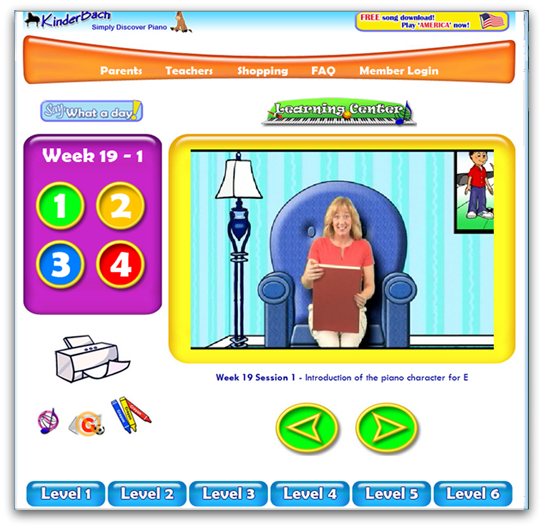
KinderBach is an early-education music program aimed to teach young children (about age 3-7) music and keyboard fundamentals in a fun, relaxed way. The lessons are available through a web-based subscription or on DVD. All you need is a computer, keyboard, and printer, along with a high speed Internet connection or a DVD player. Lessons are currently being re-formatted to work on iPad, iTouch and iPhone devices. (I actually watched several lessons on an Android smart phone when I was going through the material.) You'll also use craft materials in some of the lessons, for coloring and cutting out, and maybe laminating for durability.
This is the third time we've reviewed KinderBach. Sad to say, Youngest has outgrown the program. I could not get her to sit down and watch the videos with me this time. At the ripe old age of 13, she moaned and complained that the videos (that she'd pronounced "cute" our last time around) were painful to watch. I think it's a teen thing. She liked the videos when she was younger. You can find our previous reviews here and here. (I'm not too happy with WordPress, my former blog host, at the moment. At one of the links there was an advertisement featuring scantily clad women. I didn't put it there. I apologize if there's objectionable advertising at any of the links provided in this post.)
Lessons are very short. Many that I watched were less than ten minutes, and involve all sorts of different modalities: listening, singing, coloring, clapping, standing up straight when you hear high notes, crouching down low when you hear low notes, banging out rhythms, and eventually playing on a keyboard. A parent doesn't need musical training to use KinderBach with a child. Some parental preparation (like printing out worksheets or making manipulatives for lessons, as well as watching the lessons and playing at music with the child (yes, I said "playing at" and not just "playing" -- this curriculum feels more like a game than a lesson.)
The teacher, Miss Karri, is bright and cheerful. Her helpers are cartoon characters who help illustrate concepts. For example, a donkey named "Dodi" has his house nestled on the "D" key. It's a simple way to be able to find the "D" key anywhere along the length of a keyboard.
Lessons are slow-paced; think about early education television shows you might have seen. Perhaps boring for a ten-year-old, but just perfect for a preschooler. Miss Karri talks directly to the viewer and even waits for responses or offers a word of encouragement or praise. Your young musician might want to watch a video segment over and over, and that's fine. The program is designed to progress at your child's pace.
Workbook pages are included with the lessons, available in PDF format for printing. Here's an example of a workbook page:
This is one of the more advanced lessons. Earlier lessons will have your child coloring Dodi, or coloring beats in a measure, or illustrating other simple concepts.
Currently, 240 online lessons (60 weeks, with four lessons per week) are available, in six levels. A seventh level is under development.
Additional materials are available at the KinderBach website, including coloring books, music books, free resources, and teacher helps.
Pricing and availability
A KinderBach online subscription starts as low as $7.99 a month for a one-year subscription (with a $95.88 payment), or $19.99 a month if you pay on a monthly basis. You can also get a day pass for $5.95, which gives you access to all the levels for a day. Subscriptions come with a 30-day money back guarantee.
A coupon code is currently available that will get you a 30% discount off any order, and it's good for a year. Just use coupon code TOScrew2012 when you order.
But don't just take my word for it! You can try the first few KinderBach lessons for free at this link.
Read more TOS Crew reviews of KinderBach here.
Disclaimer: Our family received a free three-month subscription to KinderBach for review purposes. No additional compensation was involved.
Friday, January 27, 2012
Tummy bug
Last week was a busy one, and this week we're passing around a tummy bug. It's not your basic 24-hour misery, either, but seems to stretch on for several days. I've been practically useless since Monday. I thought I was just about over it last night, but woke up this morning and just couldn't get warm.
I think it's time to whip out anti-bacterial wipes and wipe down the doorknobs, computer keyboards, and other common areas.
We can't use the standard wipes; they're too toxic for us and actually make us sick. I have a supply of the thyme oil based wipes, but they smell like mouse musk to me so I've been looking for an alternative. I just found an online resource for making your own, so I'm going to give it a try when I'm feeling better. For today, I'm going to have to use the thyme oil wipes we have on hand and try not to think I'm smelling mice.
Oh dear. Youngest just announced she's going to throw up. Looks like we're in for another day of battle with the bug.
I think it's time to whip out anti-bacterial wipes and wipe down the doorknobs, computer keyboards, and other common areas.
We can't use the standard wipes; they're too toxic for us and actually make us sick. I have a supply of the thyme oil based wipes, but they smell like mouse musk to me so I've been looking for an alternative. I just found an online resource for making your own, so I'm going to give it a try when I'm feeling better. For today, I'm going to have to use the thyme oil wipes we have on hand and try not to think I'm smelling mice.
Oh dear. Youngest just announced she's going to throw up. Looks like we're in for another day of battle with the bug.
Subscribe to:
Posts (Atom)